We've all been seeing the hype created by the iPad, especially when it comes to being used in the classroom. Mobile devices are being identified as the next big tech tool for learning so... here are some links I've collecting.
Here's an example of one of MANY educational apps for the iPad.
There's a lot of dialogue going on about how our schools need to change and has been for some time. I have some posts here about this but my thoughts of the last while have been about how? The challenge for schools is around developing a whole new culture of learning and how to achieve it.
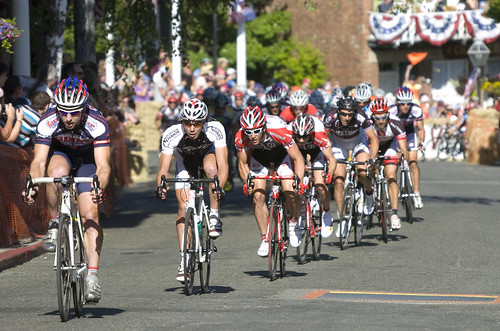
One way to gain some forward movement is to adopt a model for change based on the cycling peloton - a bunch of riders who band together in a race. I believe this analogy can be used as a model to radically transform your school.
Peloton is a french word that means 'little ball' or platoon and is used to describe the pack of riders that form a main bunch. It can often be part of a cyclists strategy to use the peloton as a form of saving energy during the race that they can use later on. Here are five ways a peloton can help us achieve some amazing momentum in changing our schools.
1. The riders in the front do most of the work.
Cyclists who ride at the front of the bunch take the full force of the wind ahead. They have to work hard and put in some amazing effort but they're also the ones who get an amazing sense of satisfaction from their work.
The teachers who are in the front are often asked, 'Where do you find the time to do all of this?' They will usually reply that it doesn't feel like extra work because it's their passion!
2. The riders in the back of the bunch take the draft.
The riders who take the draft don't have to make much effort to keep up but they benefit from the work from the leaders. They are 'drafted' along - but importantly, in the right direction.
Teachers who may not be driven to innovate and explore new methods of teaching still benefit from the actions of their colleagues. They will often start using new methods of teaching and learning, once they have seen them in action from the teacher next door.
3. The peloton uses the strength of the group to catch up the breakaways with collective speed.
There is incredible momentum when the group works together, driving the lead riders on to a long term, sustainable forward force.
Leaders can see change in their schools by resourcing and supporting the innovative teachers in their school. This can be in the form of equipment, release time, leadership positions and simple encouragement. When we give support to these leaders in these ways we also validate the methods and direction for our schools in a way that all teachers recognise.
We could be giving 20 minutes of each staff meeting to have them showcasing some innovative teaching practise in their class. Other teachers will start to ask, 'Why are some teachers being given equipment?' Or, 'Why did she get promoted?' We can all put two and two together.
So - do we want to see change in our schools? I'd suggest that we identify our lead riders and resource them to drive our schools in the right direction.
Two practical ideas...
- Could you invest in a couple of classrooms with more digital tools than normal - call it a pilot project. I think sometimes we spread our technology really thin across a school to gain a sense of 'equality' when really we're giving resources to teachers 'riding in the middle' who might not use it.
- Could you start sending some staff members to conferences (give them some extra release time) in the knowledge that they will pedal even harder when they return and drive your school further?
One blog I'd recommend following is Derek Wenmoth's. In a recent post he recalled a session he was in with Scott McLeod about adapting to the new digital era we are in. (Incidentally, I knew McLeod was in the country because I read a random article in the Southland Times about his ideas - no local reference, just there it was.)
The message that came through at the end of this session was this strong challenge -
Leaders lead! They don’t follow. They aren’t simply reactive (to government policy, constraints of policy, funding etc). They lead. They are compelled by a vision of what can be, and work with the resources available to them to achieve that. - Scott McLeod (Derek's summation)
This challenge, he writes, was in response to the talk of barriers to this adaptation - those Ministry policies, mandates, lack of funding and so on. And I'm standing on my metaphorical chair, waving a flag to his next statement. Derek goes on to say that it's time for leaders to have some courage start taking risks and be okay about failing. - They should lead and not just manage.
What are some things I'd suggest that school leaders could be doing to lead? Here are three ideas.
1. Know where you are going.
What is the direction and goal of your school in the next five years? Having a vision for the future takes time, thought and being connected to the right people to appear. There is a massive conversation taking place all over the world and online about the future of education and it's a dialogue that is too good to miss.
2. Start identifying those who will follow in your school and community.
This video captures the idea that it's the first few who follow who will start the movement. Who is on your staff, BOT and in your community that have the potential to support and carry out any initiatives you put in place.
3. Be willing to make a decision and make mistakes.
It's very easy for leaders to put decisions off. Especially when we are talking about technology , for example, and you are told to, 'Wait until November when there is a new model coming out!' I like this saying
- You don't have to get it right. You just have to get it going.
We can learn a lot from the student led inquiry model about the process of change and mistakes are only problems if we don't learn from them!
Also - the danger of collaborative leadership styles is that we wait for everyone to get on board before we act. I'm not sure that school's have any more time to wait!
There you go - I'm sure there are more ideas. Do you have anything to add?
(Photo by divinenephron, Photo license: Attribution, Noncommercial, Share Alike)
I've started collecting some resources that will help schools develop their own vision and philosophy of eLeaning looks at THEIR school. It's great to see so many putting their spin and flavour on a powerful emerging pedagogy.
It's great to see so many schools wanting to connect with their staff, parents, students and wider community in an online environment. I think many are now seeing the potential for the web to form genuine connections in a fast paced, digital world. But, how do we make sure that our digital strategy will be really effective?
Here are four keys to successful sites for schools that I think are an important element for online sites for your school or classroom.
1. Keep it local and in-house.
When schools first started tapping into the online world the internet was built on complicated and time consuming webpage programmes. Most schools hired an outside agency to design and build their website and relied on them to upload any changes. It's only natural, however, that as time has developed and the online world easier to navigate, so too have the ways that we can publish online become simpler and uncomplicated.
With a basic online understanding we can create web pages using tools like Wordpress, Blogger, Google Sites and others that are easy to use, free! All you need is someone of your staff to have some time and patience to persevere and ask for help when they need it. Having a third party handle your site can slow the process down and make us less likely to keep things current. I think it's much better if we can develop these skills within our own staff.
I wrote a post about the benefits of having a school site with up to the minute information
Things online can become stale and boring if not updated regularly. Having the last change to a site with a date of 6 months ago also reduces the credibility of your site. If we can see that things are up to date then we will be more likely to return to it! It's also time for schools to realise that they can upgrade their school website from what is essentially an online brochure. They can be engaging, interactive and fresh!
3. If it's important to you - give it some resources.
One of the keys to success with anything online, whether it's a class blog or a school website, is having the discipline and structure in place to maintain it. The cost of this will most certainly be in terms of time and sometimes this can be expensive. Can we allocate some release time each week, for example, for a staff member to spend up-keeping a site or can you diary in some time every couple of days to post on your class blog? As a wise eLearning sage once said (@nickrate, yes, you are a sage), 'If it's really valuable to you then you should spend the time on it.' Great advice. I also ask teachers, when they ask how I find the time to do all of this digital stuff... 'How much time do we spend watching T.V?'
4. Use the right tool for the right job - and then link them.
One of the mistakes I see all the time is when people use an online tool to do things it was never designed to do. They all have their uses - from wikis, to blogs, to websites, to social media sites etc. The trap can be easy to fall into when we have several purposes for a digital site and try to use only one tool.
We might, for example, want a school site for
sharing photos of special events, posting
Its newsletters, encouraging feedback from parents and sharing files between staff. Instead of using a blog for all of this we can easily link a wiki, a blog, a google calendar and a flickr account page using url links and embedding tools. Each tool will appear as a page that can be part of one central site - like this site for Salford School that uses the flash based Wix site.
Is there anything you'd add? Do you have some examples of sites or schools that cover all four keys?
Elearning is REALLY hard to define! Almost as hard to explain what makes excellent teaching - you often just know it when you see it and there are many facets to it.
In the early days of eLearning (and I like using a small 'e' - it makes the learning part the focus) the phrase was used to describe any type of classroom experience with an 'e'lectric device. I think now, however, most would admit that an 'eLearning' pedagogy has emerged.
But how would you explain it? It is about creating, communicating and collaborating but I''ve designed a model that explains it as I see it.
The venn diagram below is my attempt to show three sides of this new pedagogy and how they can interact to form this emerging teaching practice.
The three parts are Social Construction, Feedback and the Digital Element. Any part of the learning experience could fit into one, two or even three parts of the venn. So blogging, for example, can be a digital element when a post is written by someone on their own but, when they work with a partner it has the social element. It then becomes part of the feedback element when the post receives a comment.
Here's another example. A class is set an inquiry problem to redesign an outdoor area for their school that would benefit other students. They work in co-operative groups and research some solutions to the problem, based on what other students would like (Social Construction). After working through a technology design process that involved using Google Sketchup to design some plans and Skype(Digital Element) to interview a landscape designer they then build a garden for students to spend some quiet time in. They then take photos and a small video of their garden and post them to their blogs, asking for some ideas from other students in other schools about how they could improve the garden (Feedback).
This example is very close to an inquiry my class took part in last year - all except for the final part.
On the flip side, I think this venn could also be used to explain how a learning experience isn't the best example of eLearning. Taking a photo and putting on a blog fits within the digital element. But, if the post gains some constructive comments then we have two of the elements.
I'd also suggest that for an experience to be truly an eLearning one then it would involve all three at some stage of the process.
What do you think?
Post script - I discovered two other ideas for what the 'e' could stand for in digging around for this post
- 'e'nabling - the ability for the student to do things and putting them at the centre of the creating and learning.
- 'e'verywhere learning. This is probably my favourite take on it, especially with the growing smart phone movement. It's all about wireless and mobile!
This summer I entered the world of the mobile device. All I can say is, 'Wow! This has been predicted as one of the technology trends to watch, according to the 2010 Horizon Report, k12 Edition. You can download the report here.
This is what they write about mobile devices.
"Mobiles represent an untapped resource for reaching students and for bridging the gap between the learning that happens in school and the learning that happens out in the world."
The 2010 Horizon Report, K12 Edition, Page 7
It's the '...untapped resource for reaching students...' that has my wheels spinning. I've got a Samsung GT 15800 and it's amazing to suddenly have the online world at my finger tips, when ever I need it.
I'm sure I'll be posting regularly about my new mobility but here is one application that I've been enjoying over the holidays - Google's My Tracks app for android.
The video below, by Google, explains how to works a lot better than I could but, in a nut shell, it records your outdoor activity using GPS and transfers the data (using bluetooth) into your google apps account - mymaps and google docs. Here's a map from my run this afternoon, with the altitude chart) and the google docs graph I can create using the data (this chart shown is comparing the average running speed) to the right.
Talk about motivation. Now I can start to compare the data from my runs over time and watch my progress. Another great feature is the ability to add information to my map using hash tags that others can search and find on google. We can discover where others are running and explore new trails - even get competitive... if that's your style.
So, how can we use this app with our classes? One idea could be to give this to a student during our fitness run in the morning. I have a little belt bag that holds it (no I wouldn't trust them to not drop the thing) and they could wear it, transfer the map and analyse the data. They could then repeat the process, after a few weeks of training, to see the improvement. There could even be a class incentive for improvement if a number of students improved their times and average speed.
Unlimited potential...indeed.
TOP TIP: - set your phone to flight mode before using the app. This will restrict the GPS from using any 3g capability (and draining your data) when tracking your progress. I've found that the GPS is incredibly accurate, even to the nearest couple of meters! Much more accurate thah when using the google maps, app...strange.
So.. how can I justify having this little vid on my blog? Like this!
I'm a big believer in teachers having a life outside of their classrooms. Who you are out there is what you are able to bring for your students - in there. Especially when we want to make the learning authentic and real life. We actually need to show our students that we have one.
So, I'm often talking with my class about the little things like my 13 climbs up Mt Ngaruahoe , my love for Holden stationwagons (was my first car, a green one; inside and out) and how I like Star Wars movies.







.JPG)


